Article
Hosted IPTV panel or self-hosted: an honest operator comparison
Hosted IPTV panel vs self-hosted compared on the cost of your own time, security burden, control, lock-in and exit, and when each model wins for operators.
Article
What a hosted IPTV panel vendor can see: where panel, database, streams and backups live, what the vendor could access, questions to ask, and how to verify.
If you run a hosted panel, your hosted IPTV panel vendor holds part of your business. The useful question is which part, and the answer is more specific than “they host it”. The worked example is IPTVOS, an advertiser on IPTVBlog, whose operator guide documents the split between the vendor and your own servers. The method applies to any vendor.
You get a map of what lives where and what the vendor could technically see in each place. You also get ten questions to ask, and three ways to check the answers yourself: DNS, traffic and logs.
Short version: In a split-hosted panel the vendor runs the admin panel, customer area and shop; your database and your streams run on your servers. The vendor cannot see streams unless your app routes viewers through its VPN pool. It can technically reach your database, because its software needs to, and it holds your panel backups, your app build and, if you use them, your mail and payments. Ask what the vendor logs, who can read it and for how long, then verify with a DNS lookup, a traffic check and your own server logs.
The IPTVOS architecture, taken from its operator documentation and changelog, splits into three places. Most hosted panels fit the same map once you ask the right questions; a fully hosted vendor simply moves the right-hand column into the middle one.
| Component | Where it runs | Who administers it |
|---|---|---|
| Admin and reseller panel, customer area, shop | Vendor servers, one isolated panel per customer, EU region today | Vendor |
| Panel database (lines, resellers, streams, settings, ledgers) | Your main server, PostgreSQL | You own the server; the vendor’s panel process reads and writes it |
| Xtream API edge, players, ingest, streaming | Your main server and load balancers | You own the servers; updates are pushed from the panel |
| Daily cloud backup of the panel | Vendor side, restorable by you | Vendor |
| Nightly database backup | Your main server, 03:30, kept 7 days | You |
| Branded Android app build | Vendor build servers | Vendor |
| Optional: vendor’s shared BTCPay store, IPTVOS mail, VPN pool | Vendor | Vendor |
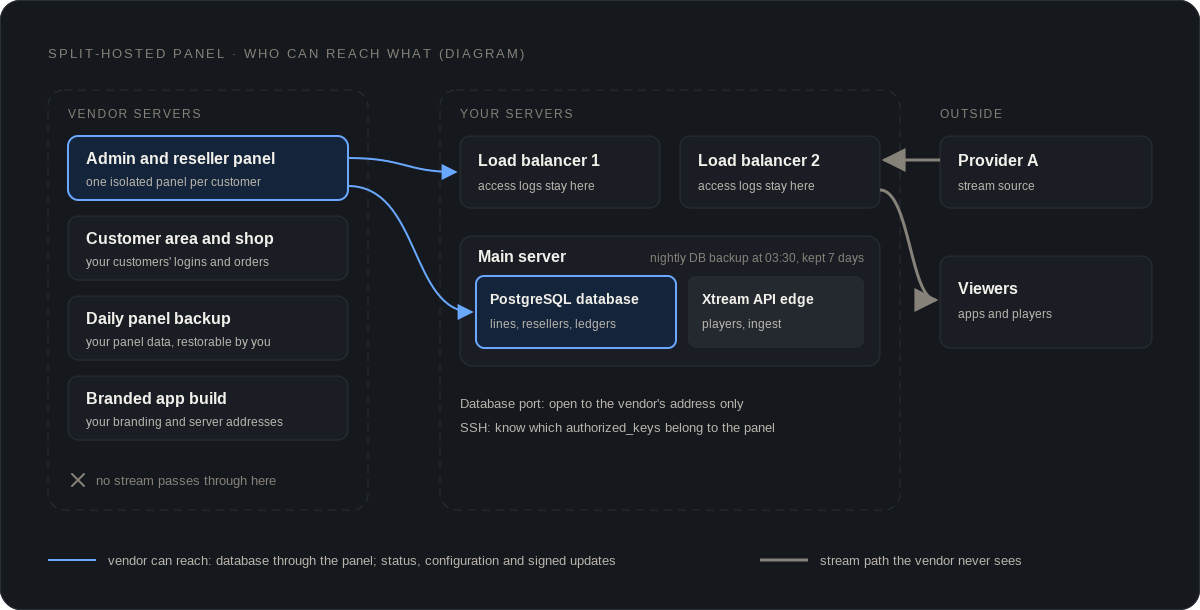
Two lines in this table do most of the work. Streams do not pass through the vendor unless your app uses its VPN pool, so nothing about what your viewers watch travels through its network. The database sits on your hardware, but the panel process at the vendor connects to it, so “on your server” is not the same as “invisible to the vendor”.
Stream content. Viewers connect to your load balancers. Provider ingest, relays between your servers and delivery to players stay on your machines. A vendor that does not carry the bytes cannot inspect, record or meter them; your hosting provider’s bandwidth bill is the measurement.
The exception is the in-app VPN, marked Beta: viewers you send through the vendor’s VPN pool send their traffic through the vendor.
Raw server access logs. The web server and edge logs on your load balancers, viewer IP by viewer IP, are files on disks you control. They leave the server only if you ship them somewhere.
Your money. With BTCPay the panel never holds funds; payments settle in your BTCPay store or wallet. Manual payments happen entirely outside the panel.
Technical ability is not the same as doing it. The point of this section is to make the list explicit so you can ask about each item.
Your servers, over SSH. The panel installs its components over SSH from the panel. How the vendor’s software authenticates afterwards is a question to ask. The verification section below shows what to look for in authorized_keys.
The database, through the panel. The panel process needs read and write access to every table to function: lines with credentials, customer e-mail addresses, reseller balances, per-line IP history used for sharing detection. Any vendor running the panel for you has staff who can, in principle, reach the same data through the same process or through a support tool. IPTVOS has an audit log for actions inside your panel; whether the vendor logs its own access to your panel and shows you that log is a question to ask, and we have not seen it documented.
Metadata about your service. The vendor monitors the status, backups and certificates of every panel around the clock. That monitoring necessarily reveals your domains, your server count and your uptime pattern. It is what you pay for; it is also a record.
Your panel backups. The daily cloud backup lives on the vendor’s side and contains your panel’s data. Ask how it is encrypted, whether vendor staff can open it, and who authorises a restore.
Your app’s branding and configuration. The vendor builds the branded Android app on its own build servers from your branding and your server addresses. The vendor knows what your app looks like and where it connects.
Everything you route through the vendor’s shared services. The shared BTCPay store sees your payment flows, and the vendor’s mail service sees the e-mails you send to customers. The vendor’s VPN pool (the in-app VPN is marked Beta), if your app uses it instead of your own servers, carries your viewers’ traffic, which reintroduces the vendor into the stream path for those viewers. Each is optional, and each is a decision to make consciously rather than by default.
Updates to your servers. The panel pushes signed releases to your main server and load balancers, with automatic rollback if a release is not healthy. Signed means you can verify the publisher; it does not mean you review what is in the release before it runs on your hardware. This is true of every auto-updating product and worth saying out loud.
Send these in writing before you sign, and keep the answers.
For IPTVOS the public record answers some of these: the database runs on your main server; streams stay on your servers unless you use the vendor’s VPN pool; panel hosting is in the EU; security reviews in October 2026 were internal, not third-party. The rest are legitimate questions, and the IPTVOS review notes where the documentation is silent.
Claims about architecture leave footprints in DNS.
Take the panel address and your delivery domains. Resolve each:
dig +short panel.your-domain.example
dig +short play.your-domain.example
The panel hostname should resolve to the vendor; delivery hostnames should resolve to your own servers’ addresses, unproxied. In IPTVOS the panel can create these records at Cloudflare for you and documents that it never proxies delivery records. If a delivery hostname resolves to a vendor address or to a CDN range you did not configure, streams do not take the path the vendor described.
Then pull a playlist for a test line and check the host in a stream URL the same way. Players connect to whatever that URL says, not to what the diagram says.
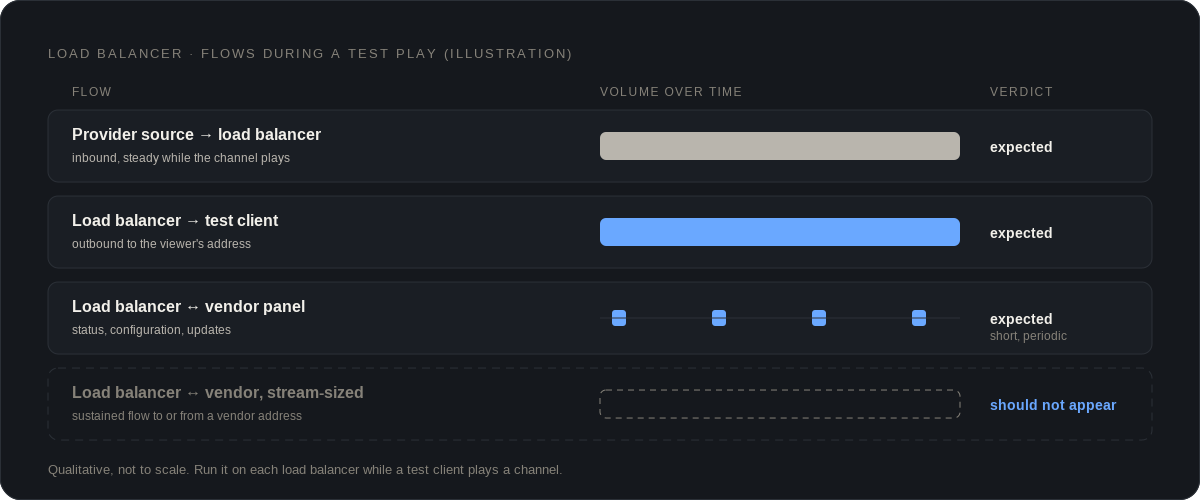
On a load balancer, while a test client plays a channel:
iftop -i eth0 -PYou should see inbound traffic from the provider or from your origin server, and outbound traffic to the test client’s address. There should be no sustained stream-sized flow to or from the vendor’s addresses. A short, periodic connection to the vendor is normal: that is the panel talking to your edge for status, configuration and updates. A multi-megabit flow is not.
Over a month, compare your hosting provider’s bandwidth figure for each load balancer with the viewer traffic the panel reports. They should agree to within the overhead you would expect. If your servers show little traffic while viewers are watching, something else is serving them.
On the main server, three places tell you who connects to what.
PostgreSQL connections. Enable connection logging or query pg_stat_activity and note the client addresses. The panel’s connections should come from a stable, documented set of vendor addresses. Anything else deserves a question.
SSH. /var/log/auth.log records every login, and ~/.ssh/authorized_keys for root and for any user the installer created lists who may log in without a password. Know which keys are the panel’s and whether you can rotate them; that is question 5 above, answered on your own disk.
Firewall. List what listens and what the firewall lets in:
ss -tlnp
ufw status verbose     # or your firewall's equivalent
The database port should not be open to the world. If the panel connects to it from the vendor, the firewall should allow exactly those source addresses and nothing more. IPTVOS’s operator guide documents exactly that: the main database’s port is open to the vendor’s address only. If it is open to everything, close it and raise a ticket.
Inside the panel, read the audit log weekly for the first month. You will learn what normal looks like, and normal is the baseline you need to notice anything else.
None of this is an accusation. A hosted vendor needs access to run the panel, and the arrangement in IPTVOS, panel at the vendor and data and streams at the operator, is a reasonable one for operators who do not want to patch servers themselves, as our hosted vs self-hosted comparison argues. The point is to know which parts you have handed over and to keep the evidence that the arrangement matches what the vendor described. Operators who did this with self-hosted panels, by reading the install scripts of Xtream UI before running them, have the same habit in a different form.
authorized_keys, pg_stat_activity and the panel’s audit log monthly.Only if the streams pass through its servers. In a split architecture like IPTVOS the streams go from your servers to the viewer and the vendor does not carry them, unless your app routes viewers through the vendor's VPN pool (a Beta feature). In a fully hosted model the vendor is the CDN and can see everything. Check where the stream URLs resolve.
Technically, in most hosted models, yes. The panel software needs the database to work, so the process the vendor runs has credentials to it, even when the database sits on your own server. What protects you is policy, access logging and contract, not architecture. Ask for all three.
Viewer IPs are logged where the stream is served. If the streaming servers are yours, the raw access logs are yours; the panel will still store per-line IP history for sharing detection in the database. Ask where that data is stored and for how long.
Resolve the hostname in a stream URL from your own M3U and confirm it is one of your servers. Then watch the network interface on a load balancer while a client plays; the outbound traffic should go to the viewer, not to a vendor address. Compare the panel's own traffic graph with your hosting provider's bandwidth bill.
Article
Hosted IPTV panel vs self-hosted compared on the cost of your own time, security burden, control, lock-in and exit, and when each model wins for operators.
Guide· legacy
Move from Xtream UI to a hosted panel without an importer: export, rebuild channels via M3U import, recreate lines, run in parallel, cut DNS over, roll back.
Article
A realistic checklist for how to start an IPTV business: content rights first, then company setup, payments, panel choice, servers, apps, support and pricing.
Comments