Guide· legacy
Xtream UI to a hosted panel: a realistic migration plan
Move from Xtream UI to a hosted panel without an importer: export, rebuild channels via M3U import, recreate lines, run in parallel, cut DNS over, roll back.
Article
Hosted IPTV panel vs self-hosted compared on the cost of your own time, security burden, control, lock-in and exit, and when each model wins for operators.

Choosing between a hosted IPTV panel and a self-hosted one is a decision about who carries the operational burden, not about features. The hosted example throughout is IPTVOS, a hosted panel that keeps your database and streams on your own servers and documents how it does that. IPTVOS is an advertiser on IPTVBlog, and its limits are named alongside its strengths.
Both models can serve the same channels to the same players. This comparison walks through the costs that do not appear on invoices, the security work you keep or hand over, what control you give up, how locked in you become, and the operator profiles where each model wins.
Short version: Self-hosting is cheaper on paper and more expensive in evenings. Hosted panels remove the install, update and security work and charge a fee for it; in return you accept the vendor’s roadmap, payment options and uptime. Large operators with staff, custom pipelines or regulatory constraints should self-host. Small and mid-sized operators without a sysadmin usually should not.
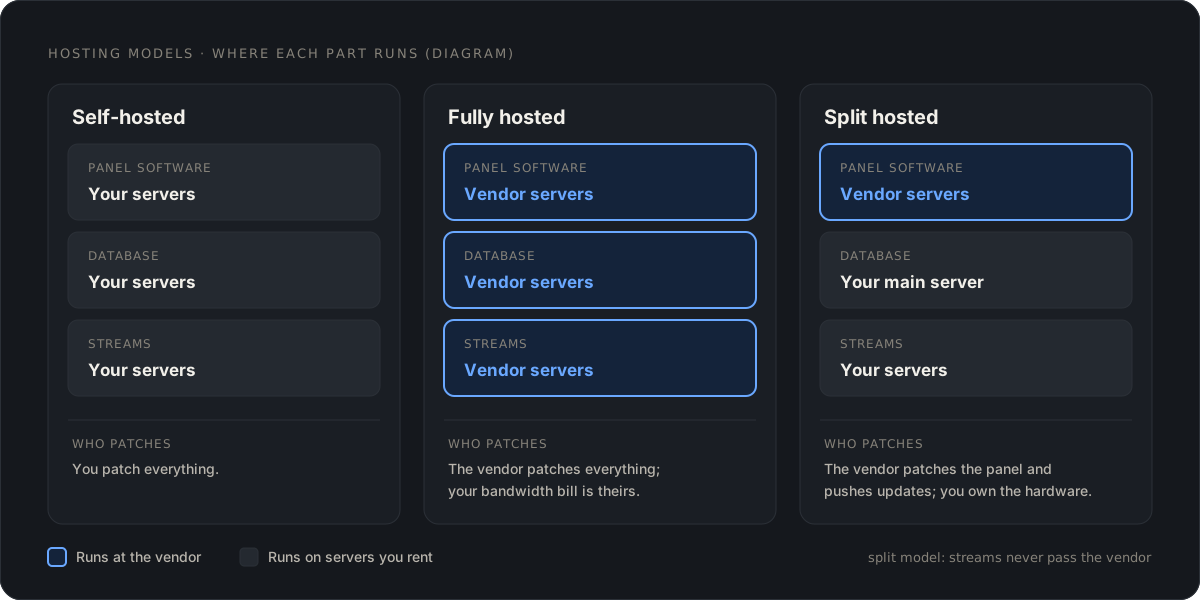
The word covers at least three arrangements, and mixing them up leads to wrong comparisons.
| Model | Panel software | Database | Streams | Who patches what |
|---|---|---|---|---|
| Self-hosted | Your servers | Your servers | Your servers | You patch everything |
| Fully hosted | Vendor servers | Vendor servers | Vendor servers | Vendor patches everything; your bandwidth bill is theirs |
| Split hosted | Vendor servers | Your main server | Your servers | Vendor patches the panel and pushes updates to your servers; you own the hardware |
Xtream UI and XUI One are self-hosted: you install the panel, the database and the streaming on servers you rent. IPTVOS is a split model: the admin panel, reseller panel, customer area and shop run at the vendor, isolated per customer, while the database and all streaming run on your own Ubuntu servers, a main server plus any number of load balancers, set up over SSH from the panel. Streams never pass through the vendor. “Managed” describes the panel only; your servers are updated from the panel, not administered by anyone else.
Keep the table in mind for the rest of this article. Most of the arguments for and against hosting depend on which row you are looking at.
Server rent is the same in both models; a load balancer pushing 2 Gbit/s costs what it costs. The difference is the panel fee against your hours.
Here is a worked example, not a benchmark. Take a small operator with one main server and two load balancers on a self-hosted panel. In our experience the recurring work looks like this:
| Task | Rule of thumb |
|---|---|
| OS and panel updates, with the reboot and the check afterwards | 2–4 hours per month |
| Certificate renewals, DNS changes, domain moves after a block | 1–2 hours per month |
| Database maintenance, backups and one restore test | 1–2 hours per month |
| Security incidents, brute-force clean-up, leaked line hunting | 2–6 hours per month, very uneven |
| The 3 a.m. outage | Once a quarter if you are lucky |
Call it 8 to 15 hours a month. Price your hour at what a freelance Linux admin would charge in your market, then put that figure next to the monthly fee on the price page of the hosted panel you are considering. If you enjoy the work and have the skills, your hour may be cheap. If you are the only person who can fix the panel and you also do sales and support, your hour is the most expensive thing in the company.
The honest counterpoint: a hosted panel does not remove your server work. In the split model you still rent and monitor the servers, and the vendor’s update mechanism can fail in ways you do not control. IPTVOS, for example, ships signed releases with automatic rollback when the new version is not healthy; that is good design, and it still means an update happened on your server while you slept.
This is where self-hosting on legacy panels loses outright. Xtream UI has been unmaintained since the 2021-era releases; its bundled nginx and PHP never receive fixes. XUI One is maintained, but proprietary, and it still relies on you to apply updates, harden the OS and watch the logs. Our Xtream UI panel explainer lists what that involves.
A hosted panel moves the panel-side security work to people whose job it is. What you should expect from a serious vendor, with IPTVOS as the reference for what exists today: two-step verification and passkeys for panel logins, team roles and an audit log, proof-of-work on sign-in and checkout against bots, encrypted play links, brute-force limits, and automatic certificates. IPTVOS documents four internal security reviews from October 2026 with the findings fixed; these are internal reviews, not a third-party audit. Ask any vendor whether an outside audit exists and whether you may read it.
What stays yours in the split model: the servers. SSH keys, firewall rules, the hosting provider’s own security, and whatever else you install next to the panel’s components. The vendor cannot patch a server you have exposed with a weak root password.
Self-hosting gives you root. You can change ports, add an nginx rule, run a custom FFmpeg build, patch the panel’s PHP if you dare. With a hosted panel you get what the panel exposes, and no more.
Where that bites, in our experience:
Where control matters less than people think: panel features. Lines, resellers, EPG, catch-up, MAG portals and Xtream API output are table stakes in any serious panel today. You rarely need root to run a channel list.
Every panel locks you in to some degree; the question is how far and how you leave.
Self-hosted: you own the database. Leaving means exporting it and rebuilding elsewhere, which is tedious but entirely in your hands; see our Xtream UI to hosted panel migration plan for how tedious.
Hosted: three questions decide the exit.
A fourth, softer lock-in: the branded app. A customer base that installed your IPTVOS-built Android TV app has the panel’s address baked into that app. Moving panels means a new app or a redirected address. IPTVOS has no importer for Xtream UI or XUI One databases, so coming in is the same amount of work as going out.
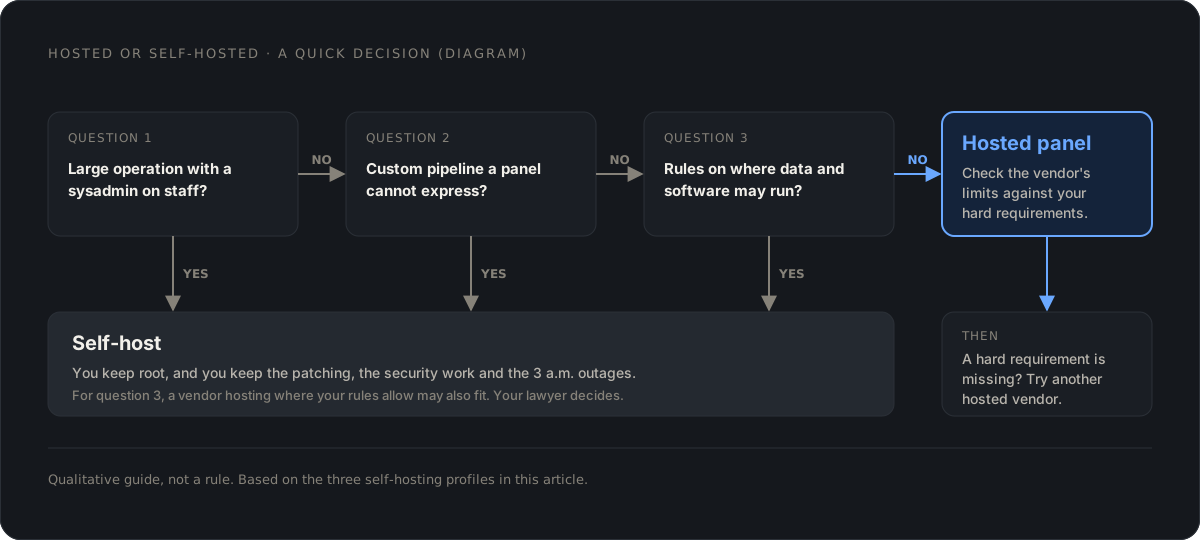
Three profiles where we would still self-host in 2026:
Large operators with a sysadmin on staff. Once someone is paid to run servers anyway, the panel fee buys less. The security argument weakens too, because the person exists to apply updates.
Custom pipelines. Multi-bitrate ladders, hardware transcoding, SRT ingest from contribution links, DRM for licensed VOD, bespoke CDN integrations. A panel’s feature list is a ceiling, and a hosted panel’s ceiling is lower because you cannot bolt things on underneath.
Regulatory and contractual constraints. A content licence or a national rule may require that systems handling subscriber data run in a given country or under your sole administration. A vendor hosting your panel in the EU, as IPTVOS does today, with North America documented as planned, may or may not fit. Your lawyer decides, not your sysadmin.
Everyone else, roughly. Specifically:
The limits still apply, and they are worth repeating for IPTVOS specifically: beta software with a release candidate in preparation as of November 2026; crypto or manual payments only; no importer from Xtream UI or XUI One; a sideloaded Android app with no iOS version and no app-store listing; EU hosting only today; no published uptime figures or SLA. If one of those is a hard requirement, the hosted model may still be right for you, with a different vendor.
Write three numbers on a page. First, the hours you spent on panel and server maintenance last quarter; your chat history with your hosting provider and your own last output will remind you. Second, what those hours are worth. Third, the yearly fee of the hosted panel you are considering, from the vendor’s own price page rather than from a blog.
If the first two numbers multiplied beat the third, and none of the three self-hosting profiles above describes you, you have your answer. If they do not, you have a well-paid hobby, and there is nothing wrong with that as long as the patches get applied.
On the invoice, rarely. A self-hosted panel costs a licence and servers; a hosted panel adds a monthly fee. Add the hours you spend on installs, updates, security and outages at the rate you would pay someone else, and the hosted fee is often cheaper for operators without a sysadmin. Compare a full year, not a month.
It depends on the architecture. In IPTVOS the panel runs at the vendor while the database and all streaming run on your own servers, so streams never pass through the vendor. Other vendors run everything on their infrastructure. Ask, and verify with DNS and a traffic check on your servers.
You lose the panel. What you keep depends on where the data lives and what you can export. Before signing, confirm you can export lines, streams and resellers in a usable format and that your servers keep working long enough to move.
Large operators with a sysadmin on staff, operators with custom transcoding or ingest pipelines a panel cannot express, and operators under regulatory or contractual rules about where data and software may run. Everyone else is paying in evenings for control they rarely use.
Guide· legacy
Move from Xtream UI to a hosted panel without an importer: export, rebuild channels via M3U import, recreate lines, run in parallel, cut DNS over, roll back.
Article
A realistic checklist for how to start an IPTV business: content rights first, then company setup, payments, panel choice, servers, apps, support and pricing.
Guide
Catch-up TV and timeshift for IPTV operators: recording windows, a worked storage example, where recordings live, Xtream timeshift URLs, players and rights.
Comments