Guide· legacy
How to uninstall Xtream UI cleanly: backup, export, remove (2026)
Remove Xtream UI from a main server or load balancer without losing data: what to back up and export, the uninstall steps, and the MariaDB and nginx clean-up.
GuideLegacy software· intermediate
Move from Xtream UI to a hosted panel without an importer: export, rebuild channels via M3U import, recreate lines, run in parallel, cut DNS over, roll back.
Legacy software
This guide documents Xtream UI and iptvos. Xtream UI has had no official maintenance since its last public releases; XUI One is proprietary with its own licence terms. Running either is your decision and your risk. We do not link to modified or cracked builds.
Moving from Xtream UI to a hosted panel is not a database import. It is a rebuild with the old panel still running next to the new one until you are sure. This guide gives you the plan we would follow, with IPTVOS as the destination: what to export, how to rebuild channels and lines without an importer, how long each phase takes, what customers will notice, and how to roll back at every point before the old servers are gone.
Xtream UI has been unmaintained since the 2021-era releases; its bundled nginx and PHP are frozen and you run it at your own risk. IPTVOS is a hosted panel that keeps the database and streams on your own servers; it is an advertiser on IPTVBlog. The method works for any hosted panel that imports M3U and speaks the Xtream Codes API. If you are moving to XUI One instead (maintained, but proprietary), you have a database importer and a shorter path; see XUI One vs Xtream UI.
Short version: There is no Xtream UI importer in IPTVOS, so you export, rebuild channels from an M3U you generate from your own
streamstable, recreate lines with the same usernames and passwords, run both panels side by side for a week, move DNS, and only then switch Xtream UI off. Keep the hostname your players use. If they connect on Xtream UI’s port 25461, plan for that port: it is not among the ports IPTVOS documents.
Xtream UI stores everything in one MariaDB database, xtream_iptvpro. A hosted panel keeps its own schema with its own assumptions about streams, servers and resellers, and will not accept that dump. IPTVOS documents exactly two migration aids: an M3U import with review and de-duplication (from a provider, a URL or an uploaded file up to 64 MB, where a re-import refreshes instead of duplicating), and lines that keep their username and password when you recreate them. There is no XUI One or Xtream UI importer in the code and none on the roadmap.
The rebuild has one upside: dead streams, duplicate categories and old test lines stay behind.
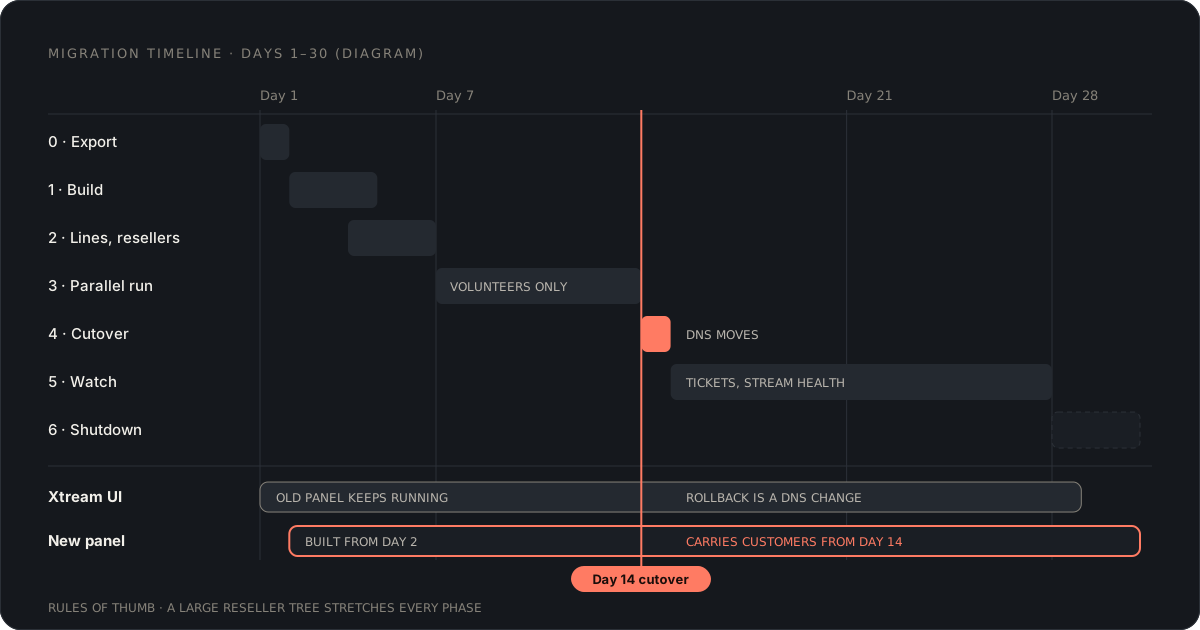
Times are rules of thumb from small and mid-sized migrations; a reseller tree with fifty active resellers stretches week 1 and week 2.
| Phase | When | What happens | Customers affected |
|---|---|---|---|
| 0. Export | Day 1 | Dump and CSV exports from Xtream UI, inventory of hostnames and ports | No |
| 1. Build | Days 2–4 | Sign up, attach main server and LBs, EPG, M3U import, packages | No |
| 2. Lines and resellers | Days 4–6 | Recreate lines with the same credentials, resellers with balances | No |
| 3. Parallel run | Days 7–13 | Your devices and one reseller on the new panel, both panels live | Only volunteers |
| 4. Cutover | Day 14 | DNS moves, old panel stays up | Yes, briefly if at all |
| 5. Watch | Days 15–28 | Support tickets, stream health, provider connection counts | Rarely |
| 6. Shutdown | Day 28+ | Stop Xtream UI, uninstall, keep the dump | No |
Follow Step 1 and Step 2 of How to uninstall Xtream UI cleanly for the exact commands. You need the full SQL dump as insurance and CSVs of streams, bouquets, users, reg_users and epg.
Add three items the uninstall guide only mentions in passing:
reg_users and packages. Resellers check their balance the day after you move them.With IPTVOS the panel itself runs at the vendor; your main server and load balancers run the database, the Xtream API edge and the streams, attached over SSH from the panel on Ubuntu 24.04. Use fresh servers rather than the ones Xtream UI occupies; you want both running at once. The server requirements guide covers sizing.
Do not import the M3U you get from a Xtream UI line’s get.php link. Those URLs point at your old panel, so the new panel would relay through the server you are about to shut down. Instead, build the playlist from the stream_source column of your streams export. A short script per row:
#EXTINF:-1 tvg-id="<epg_channel_id>" tvg-logo="<stream_icon>" group-title="<category_name>",<stream_display_name>
<first URL from stream_source>
Xtream UI stores stream_source as a JSON array of URLs, the first being the primary; later entries are backups. Check your version, because community builds differ in column names. Keep tvg-id filled with the EPG id you used, since the panel’s EPG auto-mapping works by name and country and a clean id saves you manual matching.
Upload the file. The review step shows what will be created and what the panel thinks is a duplicate. Fix the file and import again; a re-import refreshes rather than duplicating, so iterate until the category list looks like yours. Backup sources per channel are configured afterwards.
Add the XMLTV URLs from your epg export. The panel accepts plain and gzipped XMLTV with priorities and time offsets per source. Let auto-mapping run, then spot-check twenty channels across your main categories before you move on.
Your bouquets become packages. The panel guides you through creating them; the mapping is usually not one to one, because Xtream UI operators often had a bouquet per category and a package per price. Write the mapping down. You need it when you recreate lines.
Lines keep their username and password when you create them with the same values. That is the whole trick behind a silent cutover. For each row in your users export you need username, password, expiry, maximum connections and the packages that replace its bouquets.
For a few dozen lines, do it by hand. For thousands, use the panel’s API: in IPTVOS every account can create API keys (My account › API keys), and POST /api/admin/lines creates a line with a username, a password and a package. Keys allow 300 requests per minute, so 3,000 lines take about ten minutes.
My account › API documentation lists the other fields the call takes, such as expiry and connection limit; check it before you write the script. The bulk bar in the line list can then set expiry dates and connections for many lines at once.
Resellers are three tiers in IPTVOS (super reseller, reseller, sub-reseller) with a credit ledger. Recreate each reseller with the opening balance from your export. A day before the cutover, send each one their new login and one sentence for their customers: nothing changes, or here is the new address.
MAG and Smart STB boxes are the exception. Their portal URL changes, and MAC bindings have to be entered again. Count them now; they are your support load on cutover day.
For a week, keep customers on Xtream UI and move only your own devices, your support staff and one reseller who agreed to help. Watch:
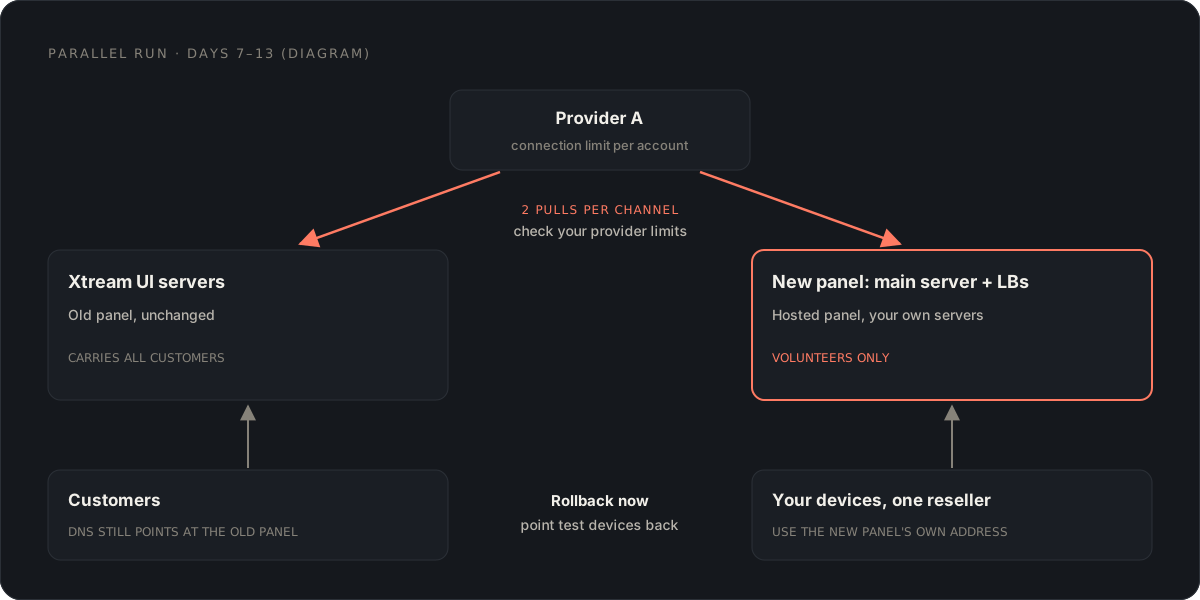
Two decisions made in Phase 0 decide how this goes.
Same hostname. Point the hostname your players use at the new panel’s delivery address. The panel can manage Cloudflare DNS records for you and issues certificates automatically; records for delivery domains stay unproxied, as streams must not go through Cloudflare.
Lower the TTL to 300 seconds the day before. Most clients re-resolve within minutes, some set-top boxes only after a reboot.
Same port. Many Xtream UI clients use http://host:25461. IPTVOS’s operator guide lists the ports its streaming servers open: 80 and 443 for the Xtream API, M3U and web player, 8888 and 8443 for HLS. Port 25461 is not among them, and we would not assume you can add it.
That leaves two options. Tell every customer the new address. Or keep the old hostname on a small host of your own that listens on 25461 and forwards to port 80 on the new server. Test that with the three players your customers use most.
The new panel accepts legacy Xtream URLs and the XUI-style /playlist/<user>/<pass>/m3u_plus form, so old playlists keep working once they reach the new host.
Do the cutover mid-morning on a weekday, when support is awake and traffic is low. Leave Xtream UI running.
| Phase | Rollback | Cost |
|---|---|---|
| 0–2 | Nothing to roll back; customers never left | None |
| 3 | Point your test devices back | None |
| 4 | Change DNS back to the old address | Minutes, plus TTL |
| 5 | Same, but lines created or renewed on the new panel since cutover must be re-entered in Xtream UI | Hours |
| 6 | Restore the dump onto a reinstalled Xtream UI | A day, and you are back on an unmaintained panel |
Once you shut the old panel down, rollback means reinstalling software nobody maintains. That is why Phase 5 is two weeks long and why the dump stays on a disk for a year.
With the same hostname, port and credentials: usually nothing. What they do notice, in order of ticket volume in our experience:
If the port changed, add a fifth item at the top of the list: every device has to be reconfigured, and you should send the new address by e-mail and in the customer area a week ahead.
After two quiet weeks, stop the old panel on every server, then follow the uninstall guide or reinstall the OS. Cancel the servers you no longer need. Keep the SQL dump and the CSVs for a year; expiry disputes and reseller credit questions arrive later than you expect.
One honest note on the destination. IPTVOS is in beta (release candidate in preparation), takes BTCPay crypto or manually confirmed payments only, builds an Android app but no iOS app, hosts panels in the EU region, and has no Xtream UI or XUI One importer. If any of those is a blocker, the plan still applies to another hosted panel; only Phase 1 changes. Our IPTVOS review lists the rest.
For XUI One, yes: its tools script migrates a Xtream UI database. For IPTVOS there is no Xtream UI or XUI One importer; the documented path is the M3U import with duplicate detection and EPG matching, plus recreating lines with the same username and password. Ask any other hosted vendor the same question before you sign.
If the new panel answers on the same hostname and the same port with the same username and password, most Xtream-API players keep working. If the port changes, every device needs the new address. Plan the hostname and port before you build anything.
In our experience two to three weeks for a small operator: a few days to export and rebuild, a week of parallel running, and a week or two before you switch the old panel off. Large reseller trees take longer because every reseller needs to be recreated and briefed.
Movies and series stored as files on your load balancers are not covered by an M3U import of live channels. Either re-add the titles in the new panel, or use a remote-title library that holds URLs instead of files if the panel offers one. Check your version.
That is what the parallel run is for. Until you shut Xtream UI down, rollback is a DNS change back to the old address. Do not cancel the old servers until the new panel has carried your real peak traffic.
Guide· legacy
Remove Xtream UI from a main server or load balancer without losing data: what to back up and export, the uninstall steps, and the MariaDB and nginx clean-up.
Guide
Catch-up TV and timeshift for IPTV operators: recording windows, a worked storage example, where recordings live, Xtream timeshift URLs, players and rights.
Guide· legacy
Installing Xtream UI in 2026: what the R22F installer does, why Ubuntu 18.04 is a problem, what community mods change, and how to harden an unmaintained panel.
Comments