Guide
IPTV panel server requirements: main server, LBs and bandwidth
Practical IPTV panel server requirements: how to split main and load balancer roles, size CPU, RAM, NVMe and bandwidth per concurrent stream, and monitor it.
Guide· intermediate
Catch-up TV and timeshift for IPTV operators: recording windows, a worked storage example, where recordings live, Xtream timeshift URLs, players and rights.
Catch-up TV is the feature customers ask for right after the guide works: open a programme that aired last night and watch it from the start. Timeshift is its cousin, pausing and rewinding a live channel. Both are built on the same thing, a rolling recording of the channel on your servers, and both have a cost in disk, write throughput and, often overlooked, licensing. This guide explains how the recording window works, walks through a labelled storage example, shows where the files live and how apps request them through the Xtream API, and ends with the rights question you should settle before switching it on.
Short version: Catch-up means your load balancers record each enabled channel continuously and keep the last N days, usually between 1 and 30. Apps find past programmes through the EPG and request them by start time and duration via the Xtream
timeshiftURL; the panel serves the matching slice of the recording. Storage grows linearly with channels × bitrate × days, so a 7-day window on fifty channels is already tens of terabytes. Put recordings on SSD on the servers that carry the channel, keep the clocks right, and check that your content rights cover replay at all.
When you enable catch-up on a channel, the server that carries that channel writes the incoming stream to disk as it relays it to viewers. The recording is not one file. It is a sequence of segments or hourly chunks, indexed by wall-clock time, and the oldest ones are deleted as new ones arrive. The window, 1 to 30 days in most panels, is just how long a segment survives before the janitor removes it.
Three consequences follow. The recording only exists from the moment you enabled it; a 7-day window shows nothing for the first day and fills up over a week. The recording stops whenever the channel does, so a source outage leaves a hole that no setting can fill afterwards. And the recording’s time index comes from the server clock, so a drifting clock on a load balancer puts every catch-up start a few seconds or minutes off from the guide.
Catch-up is programme-based: the viewer picks “last night’s news” from the guide and the app asks for the recording from the programme’s start time for the programme’s duration. Timeshift is viewer-based: the viewer presses pause on a live channel, and the app plays from the recording a few minutes behind the live edge, or rewinds to the start of the current programme. Same files, different entry point. Panels tend to use “TV archive”, “catch-up” and “timeshift” interchangeably, and the Xtream API URL serves both.
Everything below is a worked example to show the arithmetic, not a recommendation. Replace the inputs with your own measurements.
Assume 50 channels with catch-up enabled, an average bitrate of 5 Mbps, and a 7-day window.
Add 10 to 15 percent for container overhead, index files and the gap before the janitor runs, and you are planning for roughly 21 TB of fast storage. Stretch the window to 30 days and the same fifty channels need about 90 TB. Enable catch-up on 200 channels at 7 days and you are at about 85 TB.
| Channels | Bitrate | Window | Raw storage (example) |
|---|---|---|---|
| 20 | 5 Mbps | 3 days | ~3.2 TB |
| 50 | 5 Mbps | 7 days | ~18.9 TB |
| 50 | 8 Mbps | 7 days | ~30 TB |
| 200 | 5 Mbps | 7 days | ~75 TB |
| 50 | 5 Mbps | 30 days | ~81 TB |
Two numbers are missing from the table and matter as much. Write throughput is channels × bitrate, continuous: fifty channels at 5 Mbps is 250 Mbps written to disk all day, which any SSD handles and a single HDD does not enjoy alongside reads. Read pattern is the real constraint: a hundred viewers each watching a different recording at a different position is random reads, exactly the pattern hard disks are bad at. The server requirements guide says NVMe or SSD for anything read concurrently; catch-up is the clearest case.
The cheapest lever is the channel list. Catch-up on everything is a vanity setting. Enable it on the channels customers replay, which in our experience is news, sports and a handful of entertainment channels per country, and leave the long tail live-only.
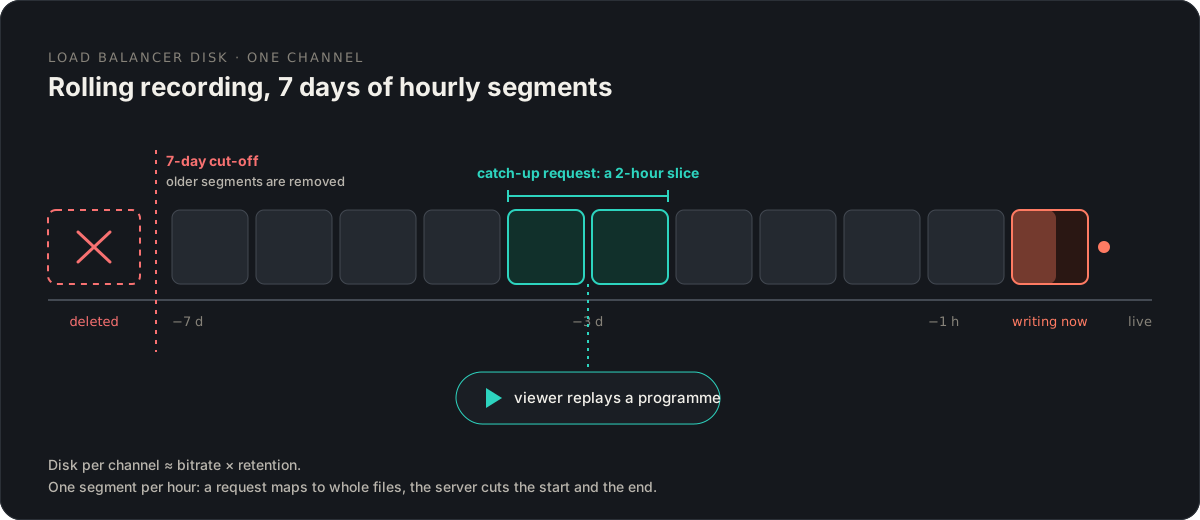
Recordings belong on the server that carries the channel, which in a multi-server panel means the load balancers, not the main server. The main server records nothing; it stores which channels have catch-up enabled, the window per channel and the EPG that apps use to find programmes. When a viewer requests a slice, the main server authorises the line and sends the request to a load balancer that has the recording.
That raises a question the sizing table hides: which load balancer? In the simplest design the server that ingests the channel (the origin, in the terms of the load balancers guide) records it, and catch-up requests for that channel go there regardless of where the viewer’s live stream would be routed. Some panels record on every server that relays the channel, which multiplies storage by the server count but spreads the read load and survives a server failure. Check which your panel does before you buy disks; the difference is a factor of your server count.
Treat recordings as expendable. Hosted and self-hosted panels alike back up the database and configuration, not terabytes of rolling video. If a catch-up disk dies, the window starts again from zero. Design for that rather than trying to make the archive durable; RAID for availability is reasonable, backup is not.
The Xtream Codes API, which most apps speak, exposes catch-up in two places. Field names and URL shapes below are the common convention; check your panel’s own documentation, since some panels add variants.
player_api.php?action=get_live_streams returns, per channel, tv_archive (1 if catch-up is on) and tv_archive_duration (the window in days). Apps use these to show a catch-up icon on the channel and to decide how far back the guide may be scrolled. get_simple_data_table returns the channel’s EPG entries, each flagged with whether a recording exists for it.
Two URL forms deliver the recording:
http://host:port/timeshift/USERNAME/PASSWORD/DURATION/YYYY-MM-DD:HH-MM/STREAM_ID.ts
http://host:port/streaming/timeshift.php?username=USERNAME&password=PASSWORD&stream=STREAM_ID&start=YYYY-MM-DD:HH-MM&duration=DURATION
start is the programme’s start in the panel’s time zone and duration is in minutes. The app builds the URL from the EPG entry the viewer selected, which is why the whole feature depends on a correct guide: a wrong EPG offset means the recording starts in the middle of the previous programme. Some apps add a minute or two of padding on either side; some do not, so viewers see “the programme starts late” tickets when the broadcaster ran over.
Whether the slice arrives as a single MPEG-TS or as an HLS playlist is a panel setting; apps handle both, but seeking inside a long MPEG-TS over HTTP depends on the app’s support for byte-range requests.
Not every app that plays your channels can use catch-up. The rule of thumb: apps that log in with the Xtream API (the three-field login) usually support it; apps that only load an M3U do not, unless the playlist carries catch-up tags.
Playlist-based players have their own convention: catchup="default" or catchup="xc", catchup-days="7" and a catchup-source template on each channel line of the M3U. Kodi’s PVR IPTV Simple Client, TiviMate and several others read these. If your panel writes them into the M3U, playlist users get catch-up too; if not, only API users do. The Windows player comparison notes which Windows apps handle it; the same families behave the same on Android and TV boxes.
Test on the apps your customers actually use, with a recording that is at least a day old, and with a programme that crosses midnight. Those two cases find most app bugs.
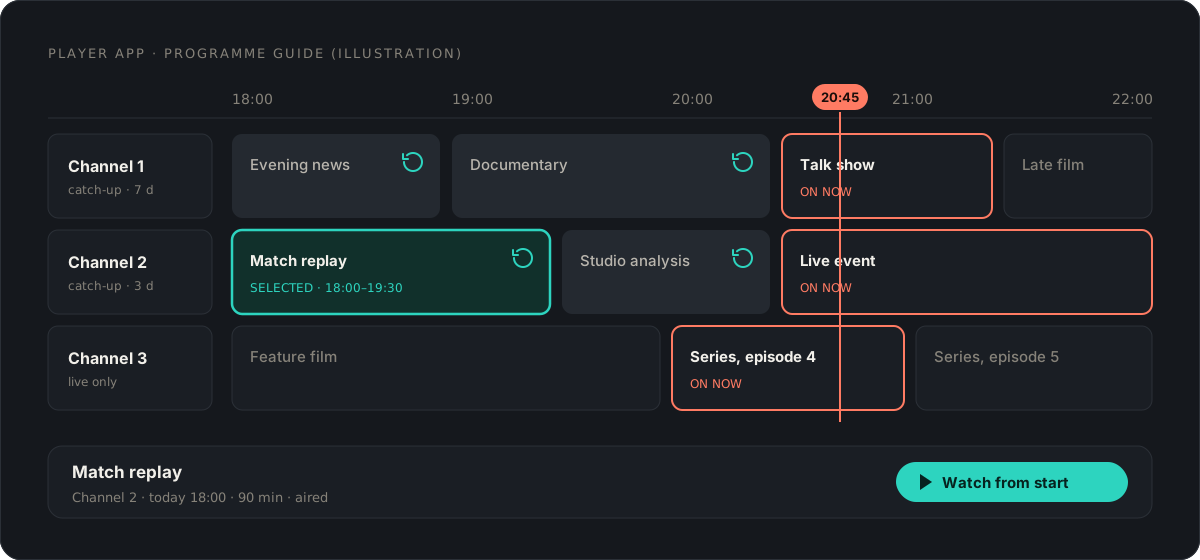
Pause and rewind reuse the same recording with no separate storage, as long as the channel has catch-up enabled. Apps implement pause differently: some buffer locally and never touch your timeshift URL, some re-request from the server at the paused position. The second kind generates more requests at peak, one more reason the main server should not also be the recording server.
Rights for catch-up differ from rights for live. A licence to retransmit a channel live is, in most agreements we have seen, silent about or explicitly excludes storing it and offering it on demand afterwards. Broadcasters sell replay rights separately, often with a cap on the window (seven days is a common figure in such agreements) and sometimes with conditions on advertising and skipping. Enabling catch-up on a channel you are licensed to carry live can therefore put you outside your agreement even though the stream itself is legitimate.
Before switching it on, read your agreements for the words “time-shifted”, “on-demand”, “storage” or “replay”, ask the rights holder in writing if the text is silent, and set the window per channel to what the agreement allows rather than the panel’s maximum. This is not legal advice; the IPTV business checklist covers why rights come before everything else and where to get real advice.
Xtream UI and XUI One call it TV archive, enable it per stream with a duration in days, and store the recordings on the server the stream is assigned to. Among hosted panels, IPTVOS offers catch-up per channel for 1 to 30 days through the standard Xtream tv_archive and timeshift URLs, with live and catch-up on every load balancer; its limits include beta status and the fact that media files on load balancers are not part of its backups, which matches the “treat recordings as expendable” advice above. The IPTVOS review has the rest.
Both read from the same recording. Catch-up means picking a past programme from the guide and playing it from its start. Timeshift means pausing or rewinding a channel you are watching live. Panels and the Xtream API often use the words interchangeably; the URL format is the same.
As few as your customers actually use. In our experience most catch-up viewing is within two or three days of broadcast. Seven days is a common promise; thirty days multiplies storage by four for a small share of plays. Offer long windows only on the channels where people ask for them.
For a usable product, yes. Apps present catch-up as a list of past programmes taken from the guide, and they request the recording by the programme's start time and duration. Without a matched, correctly timed EPG the recording exists but nobody can find it.
It can, and it should not. Recording writes continuously and playback is random reads; both compete with the database. Record on the load balancers that carry the channel, on NVMe or SSD.
Usually yes. Licences for live retransmission often say nothing about on-demand replay, or cap the window. Rights holders treat catch-up as a separate right. Ask before enabling it, and keep the window within what the agreement allows.
Guide
Practical IPTV panel server requirements: how to split main and load balancer roles, size CPU, RAM, NVMe and bandwidth per concurrent stream, and monitor it.
Guide· legacy
Remove Xtream UI from a main server or load balancer without losing data: what to back up and export, the uninstall steps, and the MariaDB and nginx clean-up.
Guide· legacy
Every XUI One panel command an operator needs: service control, the tools script, license and access-code repair, MySQL fixes and the Admin API.
Comments